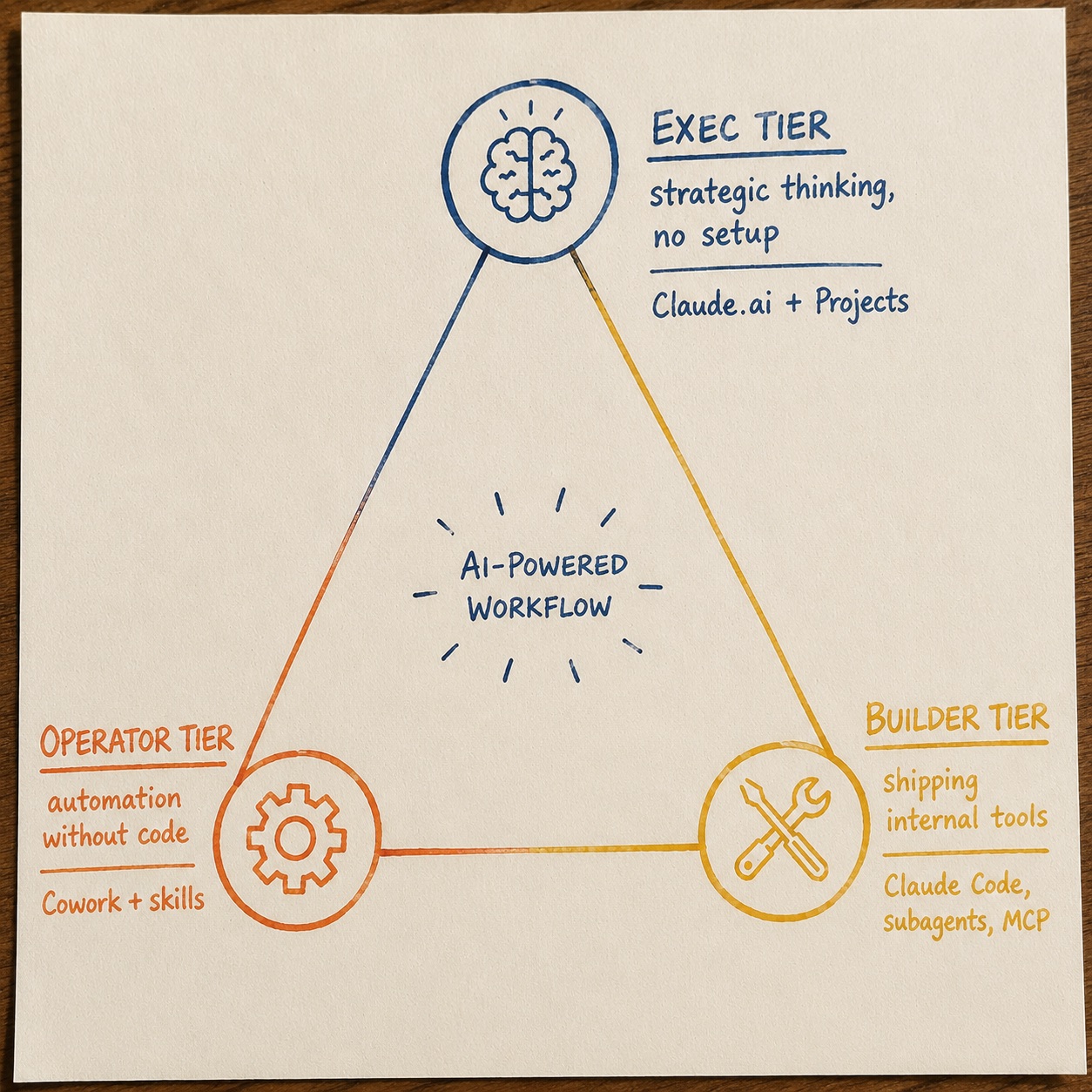
Unused AI subscriptions usually come down to tier mismatch: the person and the tool weren’t built for the same kind of work. An exec on a developer agent platform. An ops lead on a chat tool.
What follows is a framework for matching the tool to the user, based on what the user actually does day-to-day. Three tiers, the consolidation reality you probably already live in, and a small rubric for when to break from that default.
One note on bias: I work closely with the Anthropic ecosystem and my defaults lean that way. I’ll flag the meaningful alternatives at each tier so you can weigh them on your own terms.
Start with the buying reality
For most readers, the AI platform you’ll actually use is probably whichever one came with your Microsoft 365 or Google Workspace license. That’s a reasonable default: both Copilot and Gemini have become meaningfully agentic in 2026, they have the admin, DLP, and compliance tooling that regulated work needs, and they pull context from across your existing apps. For most non-power users, ecosystem fit wins.
The framework below tells you when adding a second, best-in-tier tool actually pays off for one team or one person.
The three tiers, in plain language
The AI tool space has settled into three rough tiers, each defined by what the user does day-to-day.
- Tier 1: thinking and writing, no setup.
- What you do: You spend your day reading, deciding, and writing. You don’t run recurring workflows and you don’t build software. You want the tool to work the first time you touch it.
- What works: Claude.ai with Projects for strong reasoning on long documents. Copilot in Outlook and Word if your org is on Microsoft 365. Gemini for Workspace if your org is on Google.
- What to do first: take one document you’d normally read on a plane. Run it through your tool (with six months of company context loaded in if you have that available). Ask for a one-page brief plus three questions you should be asking going into the conversation. That’s the value of the tier in fifteen minutes.
- Tier 2: automating recurring workflows, without writing code.
- What you do: You run reports, move data between files, and do the same shape of work every week. Most of the time goes to getting through the work.
- What works: Cowork (Claude on the desktop with file access) plus skills for specific document types (PowerPoint, Excel, Word, PDF). The tools assume some comfort setting up and refining a workflow, but no coding. If your org is on M365 or Workspace, Copilot or Gemini handles a meaningful chunk of this in 2026, especially recap templates, email triage, and slide formatting. Cowork stays stronger for batch file work, scheduled tasks, and workflows that cross apps outside your suite.
- What to do first: pick one weekly thing that involves moving data between files. Try it once with the relevant skill. If the second pass is faster, automate the third.
- Tier 3: shipping internal tools.
- What you do: You can read code, debug a script, and want to ship things that didn’t exist before. You’re an engineer, a technical PM, a data scientist, an IT person, or a scrappy ops lead who likes learning.
- What works: Claude Code or Codex. Both run locally, both support skills and external integrations. The difference is philosophical: Claude Code is configurable per-project (permissions, hooks, your own subagents). Codex is turnkey (opinionated defaults, native integrations). Codex currently leads the public agentic coding benchmarks (Terminal-Bench 2.0, SWE-Bench Pro). Regulated work where you need to define what the agent can touch favors Claude Code; “works out of the box” favors Codex.
- What to do first: pick one internal tool you’ve wanted for six months. Open Claude Code or Codex, give it the context, and ship a first version end-to-end this week.
When consolidation isn’t enough
Three reasons to break the M365 / Workspace default and add a second tool:
- When synthesis quality on strategic work would meaningfully change a decision. Add Claude.ai (or Claude Enterprise for admin and BAA) for one exec.
- When one team’s recurring workflow has a clear payoff that the integrated tools can’t quite hit. Add Cowork for that team’s specific work.
- When one person is shipping internal tools and needs the configurability or model strength to do it well. Add Claude Code or Codex for that builder.
In all three cases, add the second tool for the specific person or team, not org-wide. The standalone best-in-tier tools tend to be stronger at their specific tier than Copilot or Gemini are at any one of those things — especially on reasoning-heavy work.
A clarification on managers
“Manager” maps to any of the three tiers depending on how the manager actually spends their time. A people manager who reads and decides all day operates in Tier 1. A people manager who owns weekly reports and recurring workflows operates in Tier 2. An engineering manager who still reviews code is closer to Tier 3. Same title, different tier. Match on behavior.
What you should stay away from
- The smaller “AI agent platforms for non-developers:” Pick one of the majors or build in Tier 3. The middle market is mostly noise. Caveat: Codex and Claude Code are both moving into operator-tier territory, and Cowork is moving the other way. The line between Tier 2 and Tier 3 is the one most likely to shift in the next year.
- Custom enterprise rollouts before you have a single working use case: pick one team, validate the value, then expand. The “enterprise rollout” approach is how AI initiatives stall.
A purchasing how-to
- Identify the tier the user actually operates in based on what they do day-to-day. Titles are a weak proxy.
- Pick the cheapest tool in that tier that solves their problem. Hold off on the enterprise edition until you’ve validated the workflow on the cheaper one.
- Validate with a single use case before scaling. One document for Tier 1. One workflow for Tier 2. One small tool for Tier 3.
- If it sticks for thirty days, scale up. Otherwise, kill it.
How to think about this in your own org
Take a sheet of paper. List your team. For each person, write down which tier they’re in based on what they actually do. Then list, in plain English, the one recurring thing each of them would most want to stop doing manually.
That’s the input for your buying decision. The tool tier matches the person. The use case matches the recurring pain. The harder work is in figuring out who’s in which tier and what they should actually point the tool at.